
CSS Grid interview questions test whether you can reason about layout, not whether you can recite every property from memory. A strong answer usually explains the layout goal, names the Grid concepts involved, and then shows a small code example.
This guide focuses on the CSS Grid questions that come up in frontend interviews: Grid vs Flexbox, track sizing, responsive grids, placement, alignment, auto-fit, auto-fill, minmax(), and the practical bugs that appear in real projects.
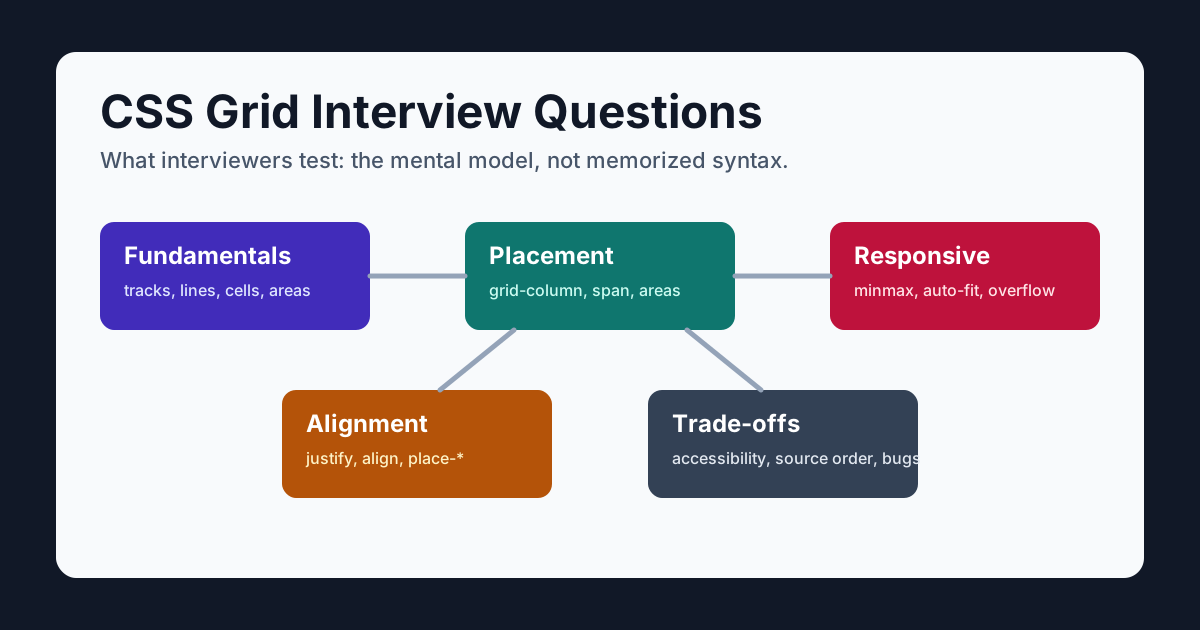
Table of Contents
- How to Answer CSS Grid Interview Questions
- CSS Grid Fundamentals
- Grid vs Flexbox Questions
- Tracks, Lines, Areas, and Placement
- Responsive CSS Grid Questions
- Alignment Questions
- Advanced and Practical Questions
- Quick Reference
How to Answer CSS Grid Interview Questions
For most CSS Grid interview questions, use a three-part answer:
- Name the layout relationships. Do items mainly flow on one axis, or must rows and columns share tracks? Which sizes come from content, available space, or explicit constraints?
- Name the Grid concepts. Mention tracks, lines, areas,
fr,minmax(),gap, or alignment where relevant. - Show the smallest useful code. Interviewers want to see that you can translate the mental model into CSS.
For example, if asked to build a responsive card grid, do not start with breakpoints. Start with the pattern:
.cards {
  display: grid;
  grid-template-columns: repeat(auto-fit, minmax(min(100%, 15rem), 1fr));
  gap: 1rem;
}
Then explain how the minimum protects card content, 1fr shares leftover space, and auto-fit collapses empty repeated tracks. The inner min() prevents a fixed minimum from overflowing a container narrower than the preferred card width.
CSS Grid Fundamentals
1. What is CSS Grid?
CSS Grid is a track-based layout system for the web. It lets you define rows and columns on a parent container and place child elements against their lines and areas.
Its distinguishing strength is coordinating two dimensions through shared tracks. Grid can still solve a one-axis layout, just as wrapped Flexbox affects two axes; choose the model that best expresses the relationships rather than treating the labels as hard limits.
.layout {
  display: grid;
  grid-template-columns: minmax(12rem, 15rem) minmax(0, 1fr);
  grid-template-rows: auto 1fr auto;
  min-block-size: 100dvh;
}
This creates a layout with two columns and three rows. The sidebar can stay fixed while the main content fills the remaining space.
2. What are grid containers and grid items?
A grid container is the element with display: grid or display: inline-grid. Its direct children become grid items.
<section class="cards">
  <article>Card 1</article>
  <article>Card 2</article>
  <article>Card 3</article>
</section>
.cards {
display: grid;
}Only direct children become grid items. Nested elements inside each card are not grid items unless their parent also becomes a grid container.
3. What are tracks, lines, cells, and areas?
Grid vocabulary matters in interviews because it shows you understand the model:
| Term | Meaning |
|---|---|
| Grid line | A numbered boundary between rows or columns |
| Grid track | A row or column between two grid lines |
| Grid cell | The intersection of one row and one column |
| Grid area | A rectangular region made of one or more cells |
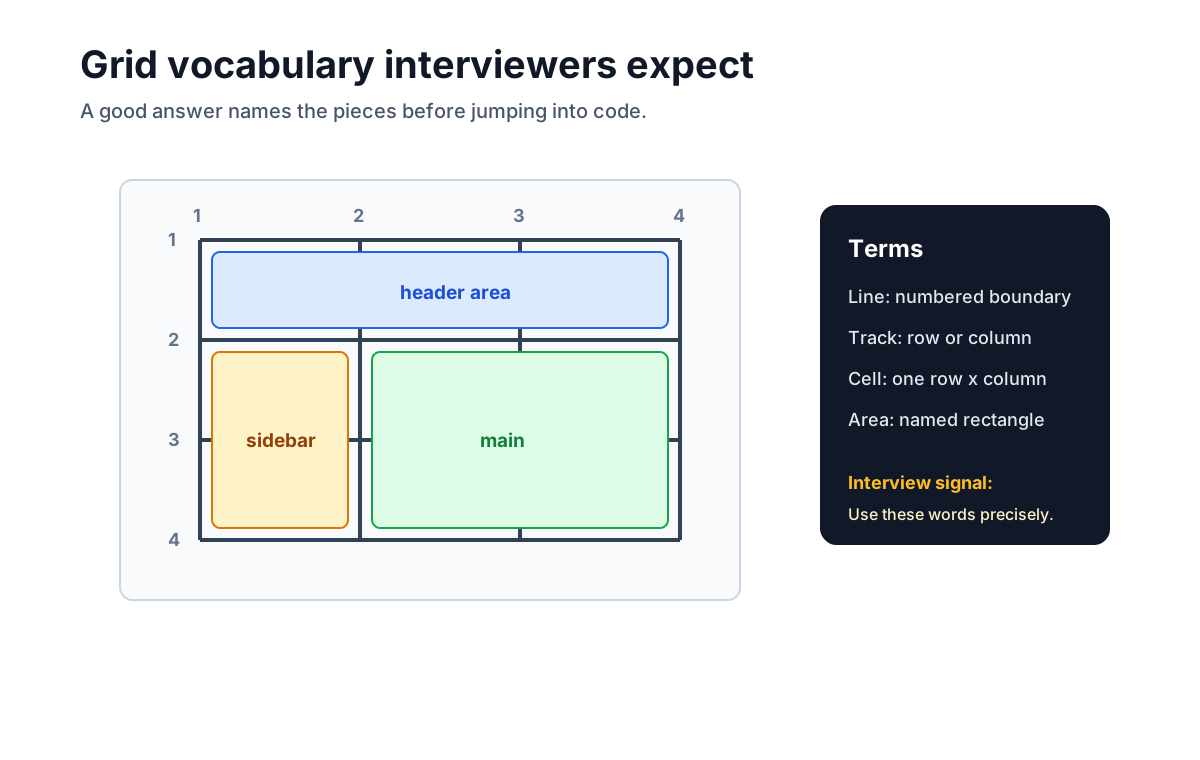
This vocabulary makes placement syntax easier to explain. For example, grid-column: 1 / 3 means the item starts at column line 1 and ends at column line 3.
4. What is the fr unit?
The fr unit represents a flex factor for distributing leftover space in a grid container; it is not simply a percentage of the container.
.layout {
  display: grid;
  grid-template-columns: 240px 1fr 2fr;
}
In this example, after non-flexible track sizing and gaps are resolved, the flex tracks divide leftover space in a 1:2 ratio. Intrinsic minimum contributions can still keep a track wider than a naive fraction calculation suggests.
An interview-friendly explanation:
frdistributes leftover space among flexible tracks; intrinsic sizing and track minimums still participate in the Grid sizing algorithm.
5. What is the difference between explicit and implicit grids?
The explicit grid is the grid you define with properties like grid-template-columns, grid-template-rows, and grid-template-areas.
The implicit grid is created automatically when items are placed outside the explicit grid or when there are more items than defined cells.
.gallery {
  display: grid;
  grid-template-columns: repeat(3, 1fr);
  grid-auto-rows: 180px;
  gap: 1rem;
}
Here, the three columns are explicit. New rows are created implicitly as more items are added, and grid-auto-rows controls their height.
Grid vs Flexbox Questions
6. What is the difference between CSS Grid and Flexbox?
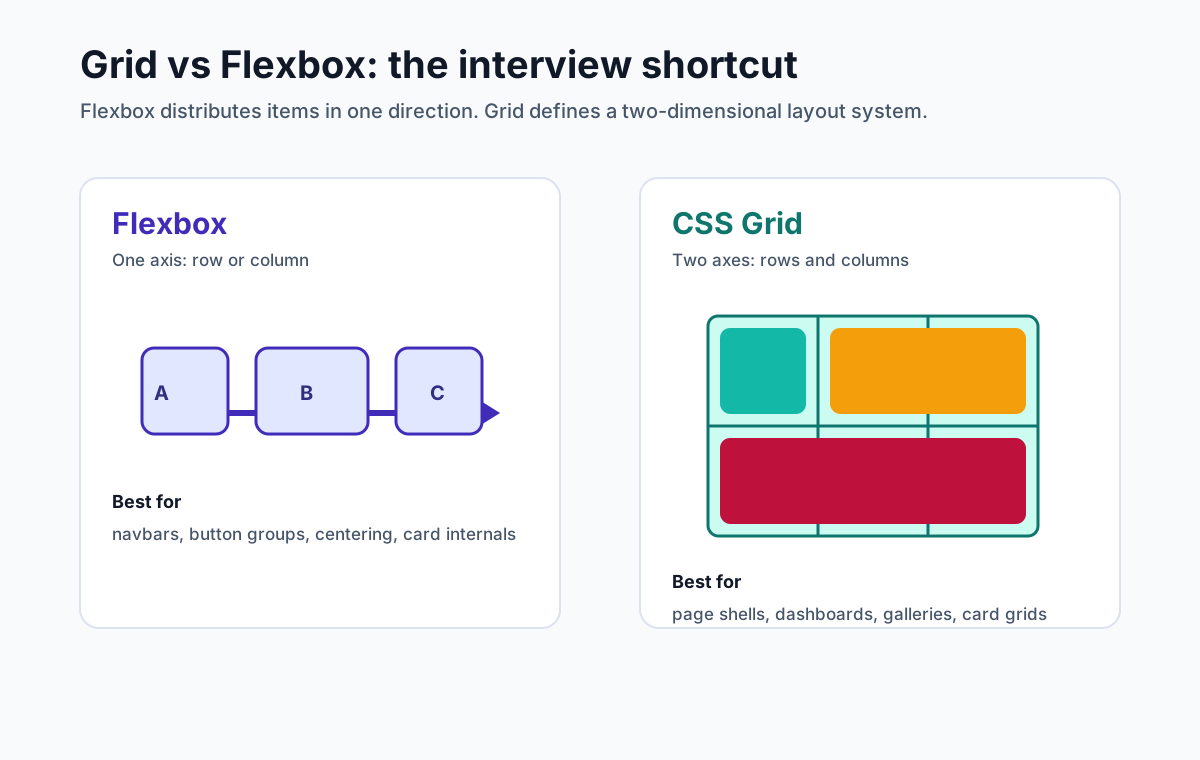
Flexbox distributes and aligns items primarily along a main axis, while Grid defines rows and columns together and aligns items to shared tracks. “One-dimensional versus two-dimensional” is a useful first approximation, not a restriction on what either tool can render.
Use Flexbox when flow and space distribution along a main axis are the dominant relationship: a button group, toolbar, or row of tags.
Use Grid when items need shared rows and columns: dashboard widgets, card galleries, image grids, or forms with aligned labels. Components may use Grid and pages may use Flexbox, so size is not the deciding factor.
7. When would you use Grid instead of Flexbox?
Use Grid when the relevant items should align to shared tracks or when explicit placement and spanning express the design clearly. Content can still influence intrinsic track sizes, so “layout-driven” does not mean that Grid ignores content.
Good Grid examples:
- A page with header, sidebar, main content, and footer
- A product card grid
- A dashboard with widgets that span different columns
- A form with labels and fields aligned in columns
- A gallery where images should align across rows
Flexbox can still be used inside those Grid items. A common pattern is Grid for shared tracks and Flexbox for one-axis flow, but treat that as an example rather than a component-versus-page rule.
8. Can you combine Grid and Flexbox?
Yes. In real projects, you often use both.
.page {
  display: grid;
  grid-template-columns: minmax(12rem, 16rem) minmax(0, 1fr);
  min-block-size: 100dvh;
}

.nav {
  display: flex;
  align-items: center;
  justify-content: space-between;
  gap: 1rem;
}
Grid defines the page structure. Flexbox aligns the navigation items inside the header. This is usually cleaner than forcing one layout tool to solve every problem.
Tracks, Lines, Areas, and Placement
9. How do you define columns and rows in CSS Grid?
Use grid-template-columns and grid-template-rows.
.dashboard {
  display: grid;
  grid-template-columns: 220px 1fr 1fr;
  grid-template-rows: auto 1fr;
  gap: 1rem;
}
Columns and rows can use fixed sizes, percentages, fr, auto, min-content, max-content, minmax(), and repeat().
10. What does repeat() do?
repeat() avoids repeating the same track definition manually.
.grid {
  display: grid;
  grid-template-columns: repeat(4, 1fr);
}
This creates four equal columns. It is equivalent to:
grid-template-columns: 1fr 1fr 1fr 1fr;The more powerful use is with responsive tracks:
grid-template-columns: repeat(auto-fit, minmax(250px, 1fr));That pattern creates as many responsive columns as can fit, but its hard 250px minimum can overflow a narrower container. A robust answer mentions how the chosen minimum relates to the actual component.
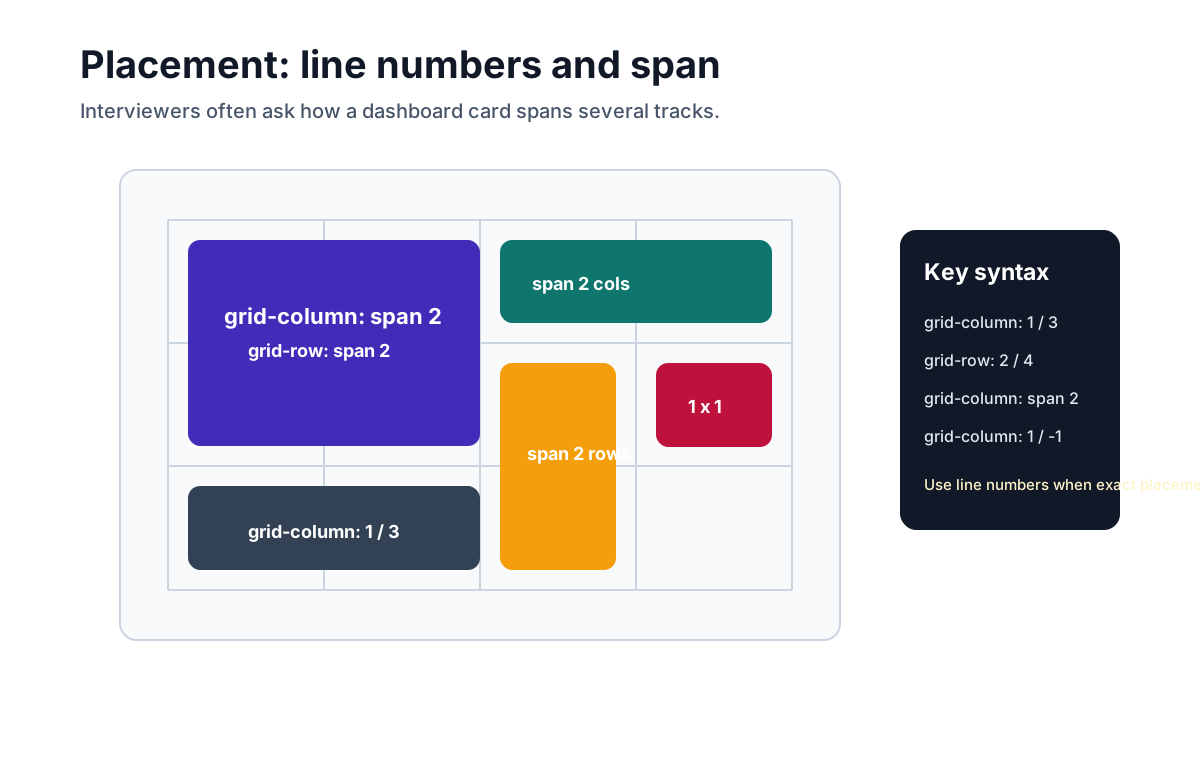
11. How do you place a grid item using line numbers?
Use grid-column and grid-row.
.featured {
  grid-column: 1 / 3;
  grid-row: 1 / 3;
}
This item starts at column line 1, ends at column line 3, starts at row line 1, and ends at row line 3.
You can also span tracks:
.featured {
  grid-column: span 2;
  grid-row: span 2;
}
12. What does grid-column: 1 / -1 mean?
grid-column: 1 / -1 makes an item span from the first column line to the last column line.
.full-width {
  grid-column: 1 / -1;
}
This is useful for headers, footers, dividers, featured cards, and form sections that should span the full grid width regardless of the number of columns.
13. How do you use grid-template-areas?
grid-template-areas lets you name parts of the layout and assign items to those names.
.page {
  display: grid;
  grid-template-areas:
    "header header"
    "sidebar main"
    "footer footer";
  grid-template-columns: minmax(12rem, 15rem) minmax(0, 1fr);
  grid-template-rows: auto 1fr auto;
  min-block-size: 100dvh;
}

.header { grid-area: header; }
.sidebar { grid-area: sidebar; }
.main { grid-area: main; }
.footer { grid-area: footer; }
This is readable in interviews because the CSS visually describes the layout. Named areas affect visual placement, not DOM or focus order, so keep the HTML sequence logical.
14. How do you make a Holy Grail layout with CSS Grid?
The Holy Grail layout has a full-width header, a full-width footer, a main column, and two sidebars.
.page {
  display: grid;
  grid-template-areas:
    "header header header"
    "left   main   right"
    "footer footer footer";
  grid-template-columns: minmax(10rem, 14rem) minmax(0, 1fr) minmax(10rem, 14rem);
  grid-template-rows: auto 1fr auto;
  min-block-size: 100dvh;
}

.header { grid-area: header; }
.left { grid-area: left; }
.main { grid-area: main; }
.right { grid-area: right; }
.footer { grid-area: footer; }
For mobile, change the areas:
@media (width < 48rem) {
  .page {
    grid-template-areas:
      "header"
      "left"
      "main"
      "right"
      "footer";
    grid-template-columns: minmax(0, 1fr);
  }
}
This is a classic Grid answer because rows and columns share named tracks. Put the elements in the same logical order as the visual layouts; changing areas must not create a confusing reading or keyboard sequence. Choose the breakpoint from content constraints, or use a container query when this is a reusable component.
Responsive CSS Grid Questions
15. How do you create a responsive card grid without media queries?
Use repeat(auto-fit, minmax(...)).
.cards {
  display: grid;
  grid-template-columns: repeat(auto-fit, minmax(min(100%, 15rem), 1fr));
  gap: 1rem;
}
This says: create as many columns as fit, prefer a 15rem minimum without exceeding the container, and let occupied tracks grow to share available space.
This is one of the most common CSS Grid interview questions because it tests track sizing, responsive thinking, and practical CSS knowledge at the same time.
16. What is the difference between auto-fit and auto-fill?
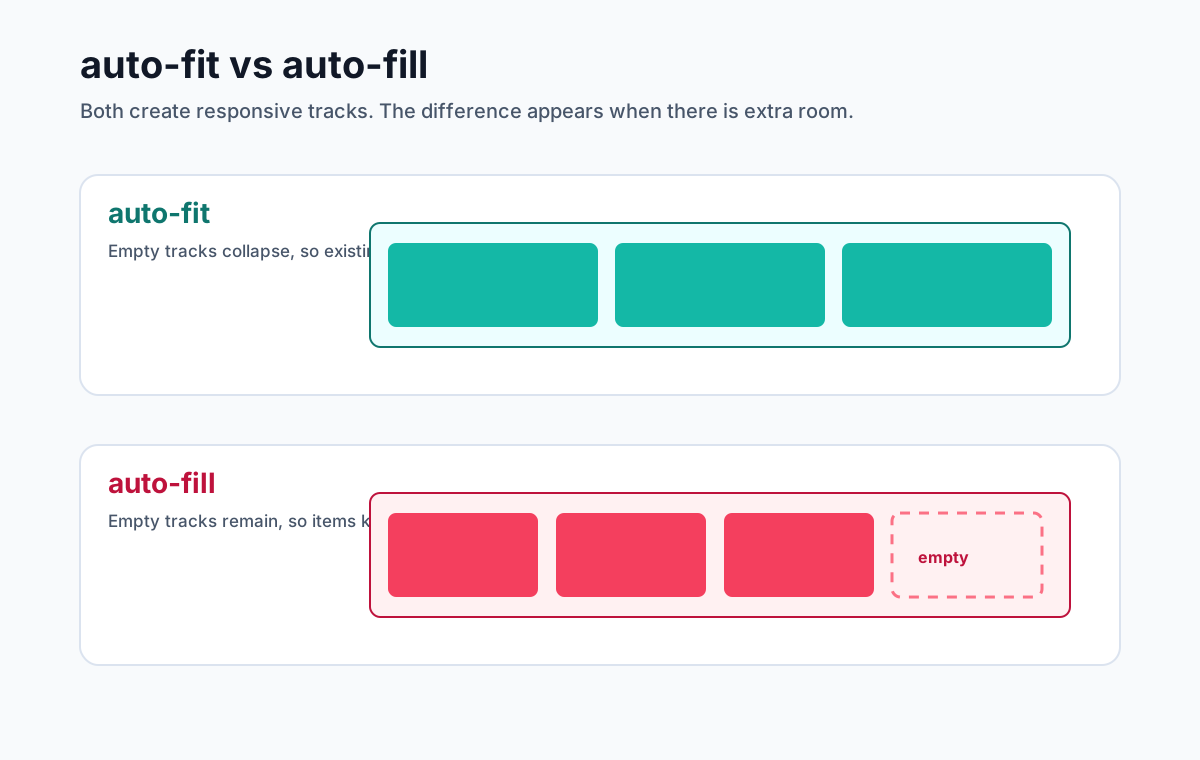
Both create as many tracks as can fit in the container. The difference is how they handle empty tracks.
auto-fit collapses empty tracks, so existing items stretch to fill the available row.
grid-template-columns: repeat(auto-fit, minmax(220px, 1fr));auto-fill keeps empty tracks, so the layout preserves space for items that are not there.
grid-template-columns: repeat(auto-fill, minmax(220px, 1fr));Neither choice is a universal default. Use auto-fill when empty repeated tracks should remain, and auto-fit when they should collapse so flexible occupied tracks can expand.
17. What does minmax() do?
minmax(min, max) defines a track size range.
grid-template-columns: minmax(200px, 1fr) 2fr;The first column has a 200px minimum and a flexible maximum. That minimum can also cause overflow in a container narrower than 200px; choose it from content constraints, and consider minmax(min(100%, 12.5rem), 1fr) for an auto-repeated card pattern.
18. Why can minmax(0, 1fr) fix overflow?
A bare flexible track such as 1fr has an automatic minimum. Min-content contributions from long words, code blocks, tables, or unbroken URLs can therefore make it wider than expected.
Using minmax(0, 1fr) tells the track it may shrink to 0 before distributing remaining space:
.layout {
  display: grid;
  grid-template-columns: minmax(0, 1fr) 320px;
}
You may also need the logical equivalent of min-width: 0 on the grid item:
.main {
  min-inline-size: 0;
}
Apply these fixes only when the intended result is to allow the track or item to shrink; then define wrapping, scrolling, or truncation for the content itself.
19. How do you change a Grid layout at different breakpoints?
For small changes, intrinsic and flexible tracks may be enough. For structural changes, use media queries when the viewport controls the design or container queries when a reusable component should respond to its own available space.
.products {
  display: grid;
  grid-template-columns: repeat(4, 1fr);
  gap: 1rem;
}

@media (width < 56rem) {
  .products {
    grid-template-columns: repeat(2, 1fr);
  }
}

@media (width < 33rem) {
  .products {
    grid-template-columns: 1fr;
  }
}
If you change grid-template-areas, keep the visual sequence compatible with DOM reading and focus order. A semantic HTML structure does not make a conflicting visual reorder accessible by itself.
Alignment Questions
20. What is the difference between justify-items and align-items in Grid?
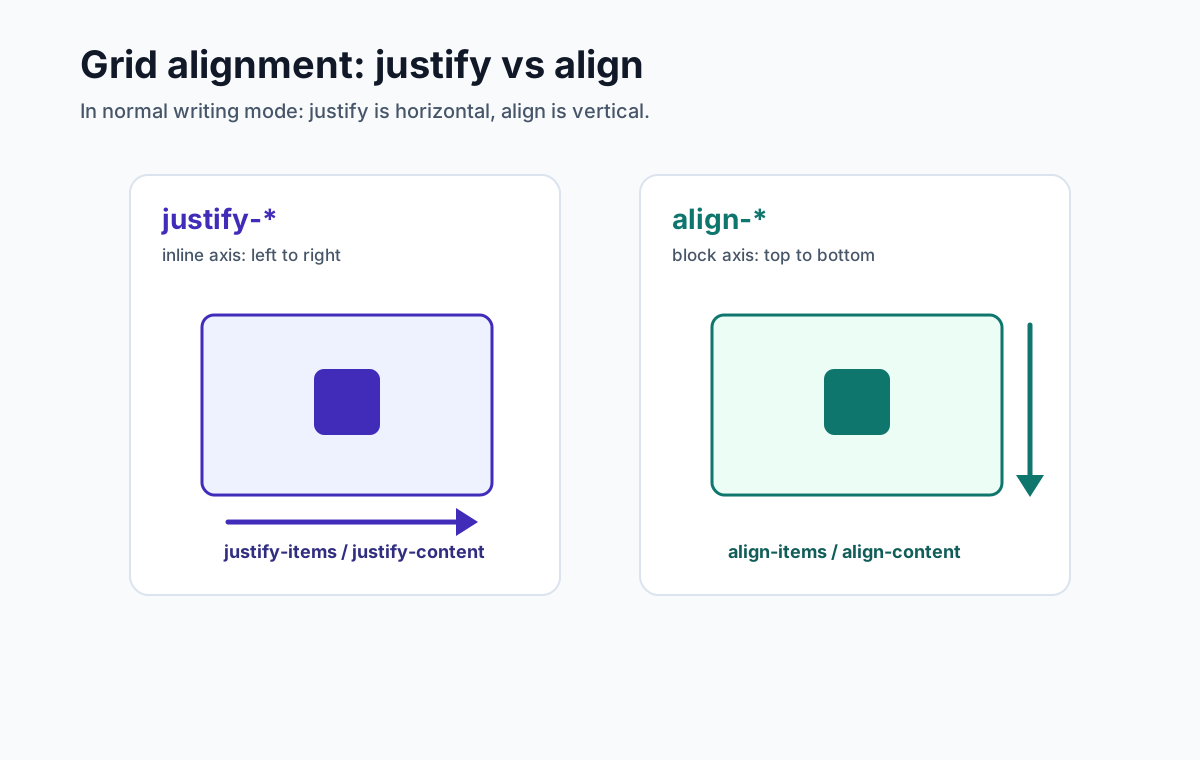
In Grid's logical axes:
justify-itemsaligns items on the inline axis inside their grid areas.align-itemsaligns items on the block axis inside their grid areas.
Those often appear horizontal and vertical in English, but writing mode and direction matter.
.grid {
  display: grid;
  justify-items: center;
  align-items: center;
}
21. What is the difference between justify-content and justify-items?
justify-items aligns each item inside its own grid area.
justify-content aligns the entire grid inside the grid container when the grid is smaller than the container.
.grid {
  display: grid;
  grid-template-columns: repeat(3, 160px);
  justify-content: center;
  justify-items: stretch;
}
Here, the three-column grid is centered inside the container, while each item stretches inside its own cell.
22. What does place-items do?
place-items is shorthand for align-items and justify-items.
.centered {
  display: grid;
  place-items: center;
  min-block-size: 100dvh;
}
This centers each child on the block and inline axes inside its grid area. The physical directions depend on writing mode.
23. How do you center an element with CSS Grid?
Use place-items: center on the parent:
.container {
  display: grid;
  place-items: center;
  min-block-size: 100dvh;
}
For one item, you can also use place-self:
.item {
  place-self: center;
}
Mention that the grid area needs free space on the relevant axis. For full-viewport examples, prefer a suitable block-size constraint such as min-block-size: 100dvh over assuming 100vh always matches the visible mobile viewport.
Advanced and Practical Questions
24. What is subgrid?
subgrid lets a nested grid inherit track sizing from its parent grid. This is useful when nested content needs to align with the outer layout.
.cards {
  display: grid;
  grid-template-columns: repeat(3, minmax(0, 1fr));
}

.card {
  grid-row: span 3;
  display: grid;
  grid-template-rows: subgrid;
}
A card spans three parent rows and exposes those inherited rows to its title, body, and footer. This can align corresponding content across cards without copying track sizes. The parent placement and span are essential; merely declaring subgrid does not create useful shared alignment by itself.
In an interview, a good answer is: subgrid solves nested alignment problems that were previously awkward with duplicated track definitions.
25. How does CSS Grid affect accessibility?
CSS Grid can change visual placement, but Grid placement does not change the DOM order. Reading and sequential focus generally follow the source order rather than the visual arrangement.
That means you should not use Grid placement to create a visual order that conflicts with the logical order of the content.
.sidebar {
  grid-column: 2;
}

.main {
  grid-column: 1;
}
This may be visually valid, but if the HTML puts the sidebar before the main content, keyboard and screen reader users may encounter the sidebar first. Prefer semantic HTML order, then use Grid for layout.
26. What is grid-auto-flow: dense?
grid-auto-flow: dense tells the browser to backfill holes in the grid when later items can fit.
.gallery {
  display: grid;
  grid-template-columns: repeat(4, 1fr);
  grid-auto-flow: dense;
}
This can fill earlier holes and create a tighter layout, but it is not the same as a masonry layout. It may place a later item before an earlier one visually while DOM reading and focus order remain unchanged, so avoid it when sequence matters.
27. How would you build a dashboard layout with CSS Grid?
Use a repeatable column system and let important widgets span more tracks.
.dashboard {
  display: grid;
  grid-template-columns: repeat(12, minmax(0, 1fr));
  gap: 1rem;
}

.metric {
  grid-column: span 3;
}

.chart {
  grid-column: span 8;
}

.activity {
  grid-column: span 4;
}

@media (width < 50rem) {
  .metric,
  .chart,
  .activity {
    grid-column: 1 / -1;
  }
}
This answer shows that you can use Grid as a layout system, not just as a gallery helper.
28. What common CSS Grid bugs should you know?
The most common Grid issues are:
| Problem | Cause | Fix |
|---|---|---|
| Grid overflows on the inline axis | Track or item has an automatic content-based minimum | If shrinking is intended, use minmax(0, 1fr) and min-inline-size: 0; then handle the content |
| Items do not align as expected | Confusing justify-* and align-* | Remember justify = inline axis, align = block axis |
| Responsive grid creates tiny cards or overflows | Minimum track size ignores real content/container constraints | Derive the minimum from the design; cap it with min(100%, ...) where appropriate |
| Visual order differs from keyboard order | Manual placement or dense packing | Keep DOM order logical |
| Spacing is wrong at container edges | Item margins are doing both gutters and outer spacing | Use gap for gutters and container padding for outer spacing |
Mentioning these problems is useful because interviews often move from "write the CSS" to "debug this layout."
29. Is CSS Grid bad for performance?
CSS Grid has a real layout cost, but there is no sound rule that it is inherently too slow for application layouts. Cost depends on DOM size, track sizing, intrinsic content, invalidation, and how often scripts force style or layout work.
Choose Grid when it models the layout, then profile a representative page if performance is a concern. Reduce unnecessary DOM, avoid read/write layout thrashing, size media, and use browser performance tools before replacing the layout system.
30. What is a strong interview answer for CSS Grid?
A strong answer connects the code to the layout reasoning:
"I would use CSS Grid because these items need shared column tracks. The parent defines them with
grid-template-columns, and children can auto-place or span tracks withgrid-column. For a responsive card grid, I would start withrepeat(auto-fit, minmax(min(100%, 15rem), 1fr)), validate the minimum against real content, and add a structural query only if the design needs one. I would also test long content and relax automatic minimums deliberately rather than hiding overflow by default."
That answer shows judgment, syntax, and debugging awareness.
Quick Reference
| Interview task | CSS Grid answer |
|---|---|
| Create a grid container | display: grid; |
| Define columns | grid-template-columns: 240px 1fr; |
| Define equal columns | grid-template-columns: repeat(3, 1fr); |
| Make a responsive card grid | repeat(auto-fit, minmax(min(100%, 15rem), 1fr)) |
| Add spacing | gap: 1rem; |
| Span full width | grid-column: 1 / -1; |
| Span two columns | grid-column: span 2; |
| Name layout regions | grid-template-areas |
| Center an item | place-items: center; |
| Allow a content track/item to shrink | minmax(0, 1fr) and min-inline-size: 0 |
| Align an item on the inline axis | justify-self or justify-items |
| Align an item on the block axis | align-self or align-items |
Practice Exercise
Before the interview, practice explaining this layout:
.pricing {
  display: grid;
  grid-template-columns: repeat(auto-fit, minmax(min(100%, 16rem), 1fr));
  gap: 1.25rem;
  container-type: inline-size;
}

@container (width >= 34rem) {
  .plan--featured {
    grid-column: span 2;
  }
}
A good explanation:
"The pricing section uses Grid because its cards should align to shared tracks.
auto-fitcreates as many columns as fit, whileminmax(min(100%, 16rem), 1fr)gives each card a preferred minimum without overflowing a narrower container. The featured plan spans two tracks only when the component's own container is wide enough, so a viewport-independent placement does not create an implicit overflow column."
Frequently Asked Questions
What CSS Grid interview questions should I prepare for?
Prepare for questions about Grid versus Flexbox, containers and items, tracks, lines, cells, areas, the fr unit, repeat(), minmax(), auto-fit and auto-fill, explicit and implicit grids, placement, alignment, responsive grids, subgrid, accessibility, and overflow debugging.
What is CSS Grid used for?
CSS Grid is used when content should align to defined tracks, especially shared rows and columns. Common uses include page shells, dashboards, card grids, galleries, forms, and pricing tables. It also works for one-axis layouts when its placement or track-sizing model fits the requirement.
What is the difference between CSS Grid and Flexbox?
Flexbox distributes and aligns items primarily along a main axis, although it can wrap into multiple lines. Grid defines rows and columns together and aligns items to shared tracks. Choose from the relationships the layout needs, not a universal component-versus-page rule.
What does grid-template-columns: repeat(auto-fit, minmax(250px, 1fr)) do?
It creates as many 250px-to-1fr columns as fit and collapses empty repeated tracks so occupied tracks can expand. Items move to new rows as space decreases. A hard 250px minimum can overflow a narrower container, so the minimum must come from real content and container constraints.
What is the difference between auto-fit and auto-fill in CSS Grid?
Both repeat as many tracks as fit. auto-fill retains empty repeated tracks, while auto-fit collapses them after placement so flexible occupied tracks can expand. Neither is universally better: choose based on whether preserving empty tracks or expanding occupied tracks matches the design.
How do you make a CSS Grid layout responsive?
Start with intrinsic and flexible tracks using minmax(), fr, repeat(), auto-fit or auto-fill, then add media or container queries for real structural changes. Test narrow containers and long content, and use minmax(0, 1fr) or min-inline-size: 0 only when allowing that content to shrink or overflow is intentional.
Official Sources
- CSS Grid Layout Module Level 2
- CSS Box Alignment Module Level 3
- CSS Values and Units Module Level 4
- CSS Containment Module Level 3
- CSS Flexible Box Layout Module Level 1
- WCAG 2.2: Understanding Focus Order
Related Articles
- CSS Flexbox & Grid Interview Guide - broader comparison of Flexbox and Grid interview patterns
- Complete Frontend Developer Interview Guide - full frontend interview roadmap
- HTML5 Accessibility Interview Guide - semantic HTML, ARIA, keyboard access, and accessibility questions
- Web Performance Interview Guide - Core Web Vitals, rendering, images, and frontend performance